Updated October 12, 2026. The original version of this lab used MinIO for object storage. On September 11, 2026, MinIO deleted its
minio/minioandminio/mcimages from Docker Hub, so the original compose file now fails before a single container starts. The lab now gives you two replacement stores, RustFS and Ceph, with a complete compose file for each. Every Dremio step and every SQL statement stays the same, because the lab only ever depended on the S3 API. This update also fixes two mistakes in the first version. The time-travel-by-timestamp example used a date older than the table, which Dremio rejects, and the description of the file layout did not match what Dremio writes. I ran the full exercise end to end against both stores with Dremio 26.0.5 before publishing this revision.
Most people learn the open lakehouse backwards. They read five vendor pages, collect a stack of Apache project names, and still cannot answer a basic question: when I run a query, what does each piece actually do?
That gap is fixable in about an hour. The five projects that define the open lakehouse each own one layer of the problem, and once you see the layers separately, the architecture stops being a diagram and becomes obvious. Apache Parquet stores bytes on disk. Apache Iceberg turns a pile of those files into a table. Apache Polaris keeps track of which tables exist and who can touch them. Apache Arrow moves the data through memory and across the wire. Apache Ossie describes what the columns mean in business terms.
The second half of this article is a lab. You will run two containers on your laptop, one for object storage and one for a query engine, wire them together, and write a real Apache Iceberg table into an S3-compatible bucket. Then you will look at the files that landed and see the format layers with your own eyes. No cloud account, no credit card, no Spark cluster.
I work at Dremio, and Dremio is the query engine in the lab. I picked it because it runs in a single container and needs no external metastore, which keeps the exercise short. The concepts transfer to any engine.
Why the Lakehouse Split Into Layers at All
For thirty years a database was one product. Storage format, table metadata, catalog, query planner, and execution engine all shipped together and none of them were separable. That design has real advantages. The engine knows exactly how the bytes are laid out and can optimize against its own assumptions.
The cost shows up when you have more than one workload. Your BI tool wants SQL. Your data scientists want Python. Your machine learning pipeline wants to read raw files. Each of those tools has its own preferred engine, and a closed warehouse gives you exactly one door in, priced per query.
Teams solved this in the 2010s by dumping files into object storage and pointing many engines at the same directory. That worked for read-only analytics and fell apart everywhere else. Two writers touching the same directory produced corrupt results. A partially written job left half a dataset visible to readers. Renaming a column meant rewriting everything. There was no such thing as a transaction.
The lakehouse is the answer to that failure. Keep the cheap shared storage, then add back the guarantees a database gave you, defined as open specifications instead of product internals. Each guarantee lives in its own layer, and each layer has a written spec that anyone can implement.
The result is a stack you assemble rather than buy. Storage from one vendor, catalog from another, three engines reading the same tables at once, and no rewrite when you swap any single piece. That portability is the entire point, and it only works because the layers stay honest about their boundaries.
Apache Parquet: The File Layer
Parquet is a columnar file format. It is the oldest project in this group, donated to the Apache Software Foundation in 2015, and it is the default storage format for nearly every analytics system built since.
A CSV file stores data by row. All of order 1, then all of order 2. To sum one column across ten million rows, you read all ten million rows in full. Parquet flips that. It groups rows into chunks called row groups, and inside each row group it stores each column contiguously. To sum one column, you read that column and skip the rest.
Three properties fall out of that layout, and all three matter more than people expect.
Compression gets far better. A column holds one data type with repeated values, so run-length encoding and dictionary encoding do real work. A column of country codes with 200 distinct values compresses to almost nothing. Mixed row data never compresses that well.
Column pruning saves I/O. A query touching 3 columns out of 80 reads about 4 percent of the file. On object storage, where you pay per byte transferred and latency dominates, that is the difference between a two-second query and a two-minute one.
Predicate pushdown skips whole chunks. Each row group carries footer statistics with the minimum and maximum value per column. A query filtering on order_date > '2026-01-01' reads the footer, sees that a row group tops out at 2025-06-30, and skips it without decompressing a single page.
What Parquet does not give you is a table. A Parquet file knows its own schema and its own statistics. It has no idea that 4,000 sibling files in the same prefix belong to the same logical dataset, no notion of a transaction, and no way to express that three of those files were replaced by one this morning. That is the next layer’s job.
Apache Iceberg: The Table Layer
Iceberg is a specification for describing a table as a set of files, plus enough metadata to make changes to that set atomic. It came out of Netflix, was donated to the ASF in 2018, and graduated to a top-level project in 2020. The current stable Java library line is 1.11, released in mid-2026, and it implements format version 3 of the specification.
The distinction between library version and format version confuses people constantly. The library version, 1.11, is a piece of software. The format version, 3, is the on-disk contract that any implementation in any language has to honor. When a vendor says they support Iceberg, ask which format version and which operations.
Here is the structure, from the bottom up.
Data files. Parquet files holding the rows. Iceberg supports ORC and Avro too, and Parquet is what nearly everyone uses.
Manifest files. An Avro file listing data files, each with its partition values, row count, and per-column min/max statistics. One manifest describes a batch of data files.
Manifest lists. An Avro file listing the manifests that make up one snapshot, with partition range summaries for each.
Metadata files. A JSON file holding the table schema, the partition specification, the sort order, table properties, and the full history of snapshots. Every write produces a new metadata file.
The catalog pointer. One tiny piece of mutable state: which metadata file is current. Everything below it is immutable.
That last point carries all the weight. Because every file below the pointer never changes, a writer builds a complete new version of the table off to the side, then swaps the pointer in one atomic operation. Readers that started before the swap keep reading the old snapshot and see a consistent view. Readers that start after see the new one. Nobody ever sees half a commit.
Once you have immutable snapshots, several features come free rather than being bolted on.
Time travel is just reading an older metadata file. SELECT * FROM sales AT SNAPSHOT '8234...' resolves a snapshot ID and reads the file list from that point in history.
Rollback is repointing the catalog at a previous metadata file. A bad load at 3 a.m. gets undone in one statement instead of a restore from backup.
Schema evolution works because Iceberg tracks columns by a unique integer ID, not by name or position. Rename a column and the ID stays the same, so old data files still resolve correctly. Add a column and old files report null for it. Drop a column and nothing gets rewritten.
Hidden partitioning removes the worst footgun of the Hive era. In Hive, a table partitioned by day required every query to filter on the partition column by name, and a query filtering on the raw timestamp scanned everything. Iceberg records the partition as a transform of a source column, so a filter on order_ts automatically prunes partitions defined as day(order_ts). Users stop needing to know the physical layout.
One thing Iceberg deliberately leaves out is where that catalog pointer lives. The specification defines the file formats and the commit protocol, then hands the pointer problem to a pluggable catalog. Implementations include the Hive Metastore, AWS Glue, a plain filesystem-based catalog, and the REST catalog protocol that Polaris implements. A table created through one catalog is not readable through another, because each catalog holds its own record of the current metadata file. Migrating between catalogs is a real project rather than a config change, which is why the catalog choice deserves more thought than the file format choice.
Format version 3 added deletion vectors, which replace v2 position delete files with compact bitmaps. Updating a handful of rows no longer forces a rewrite of the data files that contain them, and merge-on-read queries get faster. V3 also added a variant type for semi-structured JSON and mandatory row lineage tracking.
Apache Polaris: The Catalog Layer
The catalog is the smallest component in the stack and the one that decides how open your architecture really is.
An Iceberg catalog does one job well: map a table name to the location of its current metadata file, and swap that pointer atomically when a writer commits. Add a second job on top and you have a governance boundary, because every engine has to ask the catalog where a table lives before it can read the table.
Apache Polaris is an open source implementation of the Iceberg REST Catalog specification. It was co-created by Dremio and Snowflake, donated to the Apache Software Foundation, and graduated to a top-level project on February 18, 2026.
Two things make the REST catalog spec matter more than the older catalog options.
First, it standardizes the protocol instead of the implementation. Older catalog choices bound you to a client library. A Hive Metastore catalog meant every engine needed the Hive client and Thrift. A Glue catalog meant AWS SDK calls. The REST spec turns catalog access into HTTP with a documented JSON contract, so an engine written in Rust or Python talks to the same catalog as one written in Java without shipping anyone else’s client.
Second, it moves commit logic to the server. In the older model, the client library built the new metadata and performed the atomic swap. Every engine had to implement that correctly, and subtle differences caused real corruption. With REST, the client sends the requested change and the server does the commit. One implementation of the hard part, shared by everyone.
Polaris adds credential vending on top of that, and this is the feature worth understanding even if you never deploy Polaris. Instead of giving each engine long-lived storage keys, the catalog holds the storage credentials. An engine asks for a table, the catalog checks the caller’s permissions, and it returns a short-lived, narrowly scoped storage credential valid for that table’s location only. Access control lives in one place instead of being duplicated across every engine’s configuration and every bucket policy.
Polaris organizes objects into catalogs, namespaces, and tables, with role-based access control on each level. It runs internal catalogs, where Polaris manages the tables directly, and external catalogs, where it federates to another catalog implementation.
The lab below does not use Polaris. Running a catalog service, a database for its state, object storage, and an engine is four containers and a lot of configuration, which is the wrong shape for a first exercise. Dremio ships with an internal Iceberg catalog that handles the pointer for us, and the file layout you inspect at the end is identical either way.
Apache Arrow: The In-Memory Layer
Parquet is how data rests. Arrow is how data moves.
Apache Arrow defines a standard columnar layout for data in memory, plus a serialization format for sending that layout over a network without changing it. It was co-created by Jacques Nadeau, now the CTO at Dremio, and it has become the connective tissue between analytics tools.
The problem Arrow solves is serialization tax. Before Arrow, moving a result set from a Java engine to a Python client meant converting a Java object layout to a wire format, sending it, then parsing it into a pandas layout. On large results, that conversion cost more CPU than the query. Every hop between two systems paid the same tax.
Arrow removes the conversion by making the in-memory layout and the wire layout the same thing. A record batch on the server is copied to the socket, and the client points at the received bytes as a valid Arrow buffer. No parse step. Tools that both speak Arrow exchange data at close to memory bandwidth.
The layout is also built for modern CPUs. Values in a column sit in a contiguous buffer with a separate validity bitmap for nulls, which lets a query engine process 8 or 16 values per instruction using SIMD registers rather than one value per loop iteration. Vectorized execution is what makes columnar engines fast, and Arrow is the layout that makes vectorized execution straightforward to write.
Two adjacent pieces are worth naming because they show up in real deployments. Arrow Flight is a gRPC-based protocol for moving Arrow record batches between processes, and Arrow Flight SQL adds a database-style interface on top, so a client submits SQL and receives Arrow batches directly. Dremio exposes Flight SQL on port 32010, which is one of the ports you will map in the lab.
Parquet and Arrow are frequently confused because both are columnar. Parquet optimizes for size on disk with heavy encoding and compression. Arrow optimizes for CPU access speed with a fixed, predictable layout and no decoding step. An engine reads Parquet, decodes it into Arrow buffers, and works from there.
Apache Ossie: The Semantic Layer
The newest project in this group solves the problem that survives after all the technical layers work perfectly.
Apache Ossie is an open specification for semantic layers and ontologies. It started life as Open Semantic Interchange, was renamed to avoid a clash with the Open Source Initiative acronym, and entered the Apache Incubator on June 22, 2026. It is a specification project rather than a runtime, and it is still incubating, so treat it as a direction rather than a dependency.
The problem is definition drift. “Monthly Active Users” exists in the CRM, in the warehouse, and in three BI dashboards, and the four definitions disagree on whether a user who logged in through the mobile app on the last day of the month counts. Every organization past a certain size has this problem, and it never gets solved by fixing one dashboard, because the definitions are trapped inside whichever tool created them.
Ossie defines a vendor-neutral YAML format for expressing metrics, dimensions, relationships, and broader business concepts. A BI platform, a query engine, or an AI agent reads the same definition file and computes the same number. The definition moves with the data instead of living in a proprietary model file.
The agent angle is the reason this project got funded and staffed now rather than five years ago. A human analyst who gets a strange number investigates. An AI agent that gets a strange number writes it into a report with confidence. Giving agents a machine-readable, governed definition of what a metric means is the difference between an agent that helps and one that generates plausible nonsense at scale. Contributors include Snowflake, Salesforce, Databricks, dbt Labs, RelationalAI, GoodData, and Honeydew, which tells you the industry treats this as shared infrastructure rather than a competitive surface.
Ossie sits above the lab you are about to run. You will not configure it. Knowing the layer exists explains why “semantic layer” keeps appearing in lakehouse conversations that are otherwise about file formats.
How the Five Layers Cooperate in One Query
Walk a single query through the stack and the division of labor becomes concrete.
An analyst runs SELECT region, SUM(amount) FROM sales WHERE order_date >= DATE '2026-01-01' GROUP BY region.
The engine parses the SQL and asks the catalog for the table named sales. The catalog checks permissions and returns the location of the current metadata file, plus a scoped storage credential if it does credential vending.
The engine reads the Iceberg metadata file, follows it to the manifest list for the current snapshot, and reads the manifests. Each manifest entry carries partition values and column statistics. The engine drops every data file whose order_date maximum falls before 2026-01-01. A table with 40,000 files becomes a scan list of 900 without a single byte of table data being read.
For each surviving Parquet file, the engine reads the footer, drops row groups whose statistics fail the filter, and requests byte ranges covering only the region, amount, and order_date columns.
Those bytes get decoded into Arrow buffers in memory. Aggregation runs vectorized over those buffers, and partial results merge across threads and nodes in the same layout.
The final result travels to the client as Arrow record batches over Flight SQL, with no serialization step.
If the organization uses Ossie, the analyst never wrote that SQL. They asked for revenue by region, and a tool translated it using the governed metric definition, producing SQL that matches what every other tool in the company produces for the same question.
Five specifications, five jobs, zero overlap. That is the design.
Held side by side, the boundaries are easy to keep straight:
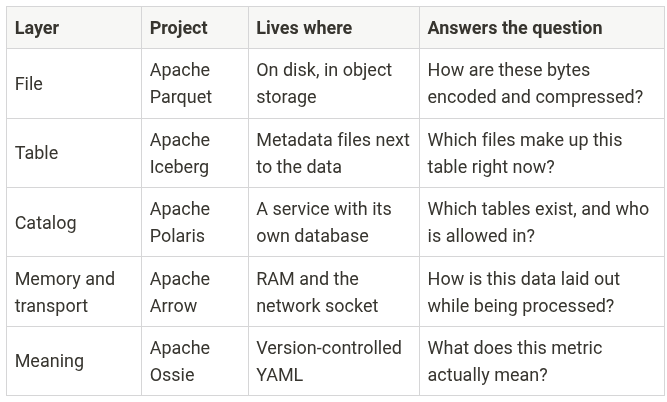
The useful test for any new tool you evaluate is which of these rows it replaces and which it merely reads. A product that reads Iceberg tables somebody else wrote sits in a different category from one that creates, writes, and commits through the standard catalog API. Both say “Iceberg support” on the website.
The Lab: What You Are Building
Two containers, plus a short-lived helper for one of the storage options.
An S3-compatible object store holds your data lake. You pick one of two. RustFS is a single Rust binary with a web console. Ceph RADOS Gateway (RGW) is the S3 front end of Ceph, the storage system behind a large share of on-premises clouds. Both speak the S3 API, so anything that talks to Amazon S3 talks to either one with a changed endpoint.
Dremio provides the SQL engine, the Iceberg write path, and the web console. Dremio Community Edition runs as a single container with an embedded coordinator, executor, and ZooKeeper.
The exercise has four steps. Start the stack. Confirm the bucket exists. Add the object store to Dremio as a source configured for S3 compatibility. Write, query, and evolve an Iceberg table, then look at the files it produced.
Earlier versions of this lab used MinIO, and that choice no longer works. MinIO stopped publishing community container images in October 2025 and archived its GitHub repository in April 2026. On September 11, 2026, it deleted the minio/minio and minio/mc repositories from Docker Hub entirely. Any compose file that pulls those images now fails with “repository does not exist” before a single container starts. The good news is that the lab never depended on MinIO itself. It depended on the S3 API. Swap the storage container and the endpoint, and every Dremio step and every SQL statement stays the same.
Requirements: Docker Desktop, roughly 8 GB of RAM available to Docker, and about 10 GB of disk.
Choosing Between RustFS and Ceph
RustFS is the faster path. It starts in seconds, uses about 150 MB of memory, ships a browser console for looking at files, and publishes current images for both Intel and ARM machines. The version pinned here, 1.0.1, shipped in October 2026.
Ceph is the heavier path and the more instructive one. The demo image boots a real Ceph monitor, manager, object storage daemon (OSD), and RGW inside one container. That is the same software that runs petabyte clusters, shrunk down to a single node. The catch is that the official demo image is frozen. The Ceph project deprecated its ceph-container repository and moved container builds into the main Ceph codebase, and quay.io/ceph/demo:latest-squid was last built in December 2024 on Ceph 19.2.0. It works fine for a lab and receives no further updates, which is the same situation that ended MinIO’s run in this article. It also ships for x86 only, so Apple Silicon Macs run it under emulation.
| RustFS | Ceph RGW (demo image) | |
|---|---|---|
| Image | rustfs/rustfs:1.0.1 | quay.io/ceph/demo:latest-squid |
| S3 endpoint for Dremio | rustfs:9000 | ceph:8080 |
| Web file browser | Yes, port 9001 | No |
| Bucket creation | Helper container | Built into the image |
| Startup time | A few seconds | About a minute |
| Apple Silicon | Native | Emulated |
Pick one. Each compose file below is complete on its own, and the rest of the lab works with either.
Compose File A: RustFS
Create a directory, save this as docker-compose.yml, and read the explanation before running it.
services:
  rustfs:
    image: rustfs/rustfs:1.0.1
    container_name: rustfs
    ports:
      - "9000:9000"
      - "9001:9001"
    environment:
      RUSTFS_ACCESS_KEY: admin
      RUSTFS_SECRET_KEY: password
      RUSTFS_ADDRESS: ":9000"
      RUSTFS_CONSOLE_ADDRESS: ":9001"
      RUSTFS_CONSOLE_ENABLE: "true"
    volumes:
      - rustfs-data:/data
    networks:
      - lakehouse

  createbucket:
    image: amazon/aws-cli:2.37.12
    container_name: createbucket
    depends_on:
      - rustfs
    environment:
      AWS_ACCESS_KEY_ID: admin
      AWS_SECRET_ACCESS_KEY: password
      AWS_DEFAULT_REGION: us-east-1
    entrypoint: >
      /bin/sh -c "
      aws configure set default.s3.addressing_style path;
      until aws --endpoint-url http://rustfs:9000 s3 ls; do sleep 2; done;
      aws --endpoint-url http://rustfs:9000 s3 mb s3://lakehouse || true;
      aws --endpoint-url http://rustfs:9000 s3 ls;
      "
    networks:
      - lakehouse

  dremio:
    image: dremio/dremio-oss:26.0.5
    container_name: dremio
    ports:
      - "9047:9047"
      - "31010:31010"
      - "32010:32010"
      - "45678:45678"
    environment:
      DREMIO_JAVA_SERVER_EXTRA_OPTS: -Dpaths.dist=file:///opt/dremio/data/dist
    volumes:
      - dremio-data:/opt/dremio/data
    depends_on:
      - rustfs
    networks:
      - lakehouse

volumes:
  rustfs-data:
  dremio-data:

networks:
  lakehouse:
Now the details that matter.
Pinned tags. rustfs/rustfs:1.0.1 and dremio/dremio-oss:26.0.5 pin exact releases, so the exercise stays reproducible. At the time of writing, 26.0.5 and latest point to the same Dremio image. The MinIO story is the whole argument for pinning. A tag you do not control can change under you, and a repository you do not control can disappear.
Two RustFS ports. Port 9000 is the S3 API endpoint, and Dremio talks to that one. Port 9001 is the RustFS console, a browser UI for buckets and objects that you use later to look at files.
Credentials. RUSTFS_ACCESS_KEY and RUSTFS_SECRET_KEY become the S3 access key and secret key. In the Dremio source configuration, admin goes in the access key field and password goes in the secret key field. RustFS prints a warning at startup if you leave its built-in default of rustfsadmin in place. Real deployments create scoped users and never hand out root keys.
The console settings. RUSTFS_CONSOLE_ENABLE turns on the browser UI, and RUSTFS_CONSOLE_ADDRESS pins it to port 9001 so your bookmark keeps working across restarts.
The named volume. The RustFS container runs as a non-root user with ID 10001. A named volume needs no setup. If you swap it for a bind mount to a folder on your laptop, run chown -R 10001:10001 on that folder first, or RustFS exits with a permission denied error.
The createbucket service. This container runs the AWS command-line client once and exits. The AWS CLI talks to any S3-compatible store, so it replaces MinIO’s old mc client without tying the lab to one storage vendor. The first line switches the client to path-style addressing, which the Dremio section explains. The until loop retries until RustFS answers, which handles the race where the client starts before the server is listening. s3 mb creates the bucket, and || true keeps a restart from failing when the bucket already exists. The final s3 ls prints the bucket list to the container log so you have a visible confirmation. Compose reports this container as exited, and that is correct.
Dremio’s four ports. 9047 is the web console and REST API. 31010 is the legacy ODBC/JDBC port. 32010 is Arrow Flight SQL, the fast path discussed earlier. 45678 is internal node-to-node communication, needed even in single-node mode.
The DREMIO_JAVA_SERVER_EXTRA_OPTS line. This sets Dremio’s distributed storage path to a directory inside the container’s data volume. Dremio uses distributed storage to hold job results, uploads, and Reflections. Without setting it, Reflections stay unavailable. This one variable is the difference between a container that starts cleanly and one that complains about missing distributed storage configuration.
Named volumes. rustfs-data keeps your Iceberg files across restarts. dremio-data keeps Dremio’s own catalog, source definitions, and user accounts. Drop these and you start over from the signup screen.
The shared network. Both containers join the lakehouse network, so Dremio reaches RustFS at the hostname rustfs on port 9000. This is the single detail that trips up the most people, and the Dremio section explains why.
Compose File B: Ceph
If you picked Ceph, save this as docker-compose.yml instead.
services:
  ceph:
    image: quay.io/ceph/demo:latest-squid
    platform: linux/amd64
    container_name: ceph
    hostname: ceph
    ports:
      - "8080:8080"
    environment:
      MON_IP: 127.0.0.1
      CEPH_PUBLIC_NETWORK: 0.0.0.0/0
      DEMO_DAEMONS: osd,rgw
      CEPH_DEMO_UID: demo
      CEPH_DEMO_ACCESS_KEY: admin
      CEPH_DEMO_SECRET_KEY: password
      CEPH_DEMO_BUCKET: lakehouse
    volumes:
      - ceph-etc:/etc/ceph
      - ceph-data:/var/lib/ceph
    networks:
      - lakehouse

  dremio:
    image: dremio/dremio-oss:26.0.5
    container_name: dremio
    ports:
      - "9047:9047"
      - "31010:31010"
      - "32010:32010"
      - "45678:45678"
    environment:
      DREMIO_JAVA_SERVER_EXTRA_OPTS: -Dpaths.dist=file:///opt/dremio/data/dist
    volumes:
      - dremio-data:/opt/dremio/data
    depends_on:
      - ceph
    networks:
      - lakehouse

volumes:
  ceph-etc:
  ceph-data:
  dremio-data:

networks:
  lakehouse:
The Dremio service is identical to File A, so the explanations above still apply. The Ceph service needs its own walkthrough.
hostname: ceph. This line carries more weight than anything else in the file. The demo image names the RGW daemon after the container hostname and registers that name as the gateway’s DNS name. RGW then reads the Host header on every request. When the header names some other host, RGW assumes that host is a bucket, a feature meant for serving buckets under custom domains. Without this line, the hostname is a random container ID. Dremio connects as ceph:8080, and RGW goes looking for a bucket named ceph. You get a NoSuchBucket error on a request that never mentioned a bucket. Setting the hostname to match the service name keeps the two in agreement.
MON_IP and CEPH_PUBLIC_NETWORK. The Ceph monitor tracks cluster membership, and it binds to 127.0.0.1 here. Every Ceph daemon in this lab lives in the same container, so they all reach the monitor over loopback. RGW still listens on every interface, which is how Dremio reaches it from the other container.
DEMO_DAEMONS: osd,rgw. The demo image always starts a monitor and a manager. This line adds one OSD to store the data and one RGW to serve S3. Left at its default, the image also starts a file system metadata server, an NFS gateway, and other services this lab never touches.
Credentials and bucket. CEPH_DEMO_ACCESS_KEY and CEPH_DEMO_SECRET_KEY create an RGW user with exactly those keys. CEPH_DEMO_BUCKET creates the lakehouse bucket during bootstrap, so this stack needs no helper container.
Port 8080. RGW serves the S3 API on port 8080 in this image. Ceph has no web file browser to map, so you inspect files from the command line later in the lab.
Two volumes. Ceph keeps its configuration and keyrings in /etc/ceph and its data in /var/lib/ceph. The image refuses to start when it finds one without the other, so always keep or delete them together.
platform: linux/amd64. The image ships for x86 only. On an Apple Silicon Mac, this line tells Docker to run it under emulation, which starts slower and works. On an Intel or AMD machine, it changes nothing.
Starting the Stack
docker compose up -d
docker compose logs -f dremio
Dremio takes 60 to 120 seconds to become available on a laptop. Watch for the log line saying the Dremio Daemon started. Open
, fill in the first-user signup form, and pick any credentials you can remember. That account is local to your container.
Confirm the bucket exists before you move on. For RustFS, run docker compose logs createbucket and look for lakehouse in the printed listing. For Ceph, run docker compose logs ceph and look for Bucket 's3://lakehouse/' created, followed by a line ending in SUCCESS.
After bootstrap, the Ceph log keeps printing health warnings about degraded data redundancy. Ceph keeps two copies of every object by default, and this cluster has a single OSD to hold them. That warning is expected in a one-node lab, and it blocks neither reads nor writes.
Adding the Object Store as a Dremio Source
In the Dremio console, click Add Source in the lower left and choose Amazon S3. Neither RustFS nor Ceph appears in the list by name because neither needs to. Both speak the S3 API, and the S3 connector handles anything that does.
Fill in the General tab:
- Name:
lake - Authentication: AWS Access Key
- AWS Access Key:
admin - AWS Access Secret:
password - Encrypt connection: unchecked
Naming the source lake instead of after the product keeps every SQL statement in this lab identical, whichever store you picked. It is a decent habit in production too. Source names end up in views, dashboards, and scripts, and a storage migration goes smoother when none of them name the old vendor.
Unchecking encryption is required here. Both stores in these compose files serve plain HTTP with no certificate. Leaving the box checked makes Dremio attempt TLS against an HTTP endpoint, and the source fails to save with a connection error that does not name the real cause.
Now open Advanced Options:
- Enable compatibility mode: checked
- Default CTAS Format: ICEBERG
- Root Path:
/
Compatibility mode is what tells Dremio it is talking to an S3-compatible store rather than Amazon S3 itself. It changes request signing and endpoint handling. Without it, Dremio builds requests against AWS endpoints and never reaches your container.
Default CTAS Format deserves a pause. S3 sources in Dremio default to writing Parquet, not Iceberg. A CREATE TABLE AS against a source left on the default produces a folder of Parquet files with no table metadata at all, which looks like it worked and gives you none of Iceberg’s guarantees. Setting this to ICEBERG is the single most important checkbox in this exercise.
Root Path of / exposes every bucket in the store as a top-level folder inside the source. Setting it to /lakehouse scopes the source to one bucket, which is closer to what you do in production.
Still in Advanced Options, find Connection Properties and add three:
| Name | Value with RustFS | Value with Ceph |
|---|---|---|
fs.s3a.endpoint | rustfs:9000 | ceph:8080 |
fs.s3a.path.style.access | true | true |
dremio.s3.compat | true | true |
The endpoint value has two rules that break people constantly. It cannot include the http:// or https:// prefix, and it cannot begin with the string s3. Write the host and port and nothing else.
Use the service name, not localhost. Inside the Dremio container, localhost means the Dremio container. The names rustfs and ceph resolve through the Docker network to the storage container. This mistake produces a connection refused error that reads like a storage problem and is not one.
Path-style access matters because the default S3 addressing scheme is virtual-hosted style, which puts the bucket into the hostname as lakehouse.rustfs:9000. That hostname does not exist on your Docker network. Path style produces rustfs:9000/lakehouse, which does.
Click Save. The source appears in the left panel, and expanding it shows the lakehouse bucket. If it does not, jump to the troubleshooting section.
Writing and Reading Iceberg Tables
Open the SQL Runner and create a table.
CREATE TABLE lake.lakehouse.orders (
  order_id     INT,
  customer     VARCHAR,
  region       VARCHAR,
  amount       DOUBLE,
  order_date   DATE
) PARTITION BY (month(order_date));
The PARTITION BY (month(order_date)) clause is Iceberg’s hidden partitioning at work. You are not adding a separate month column. Iceberg records a transform of order_date, and later queries that filter on order_date get partition pruning without knowing the layout exists.
Insert some rows:
INSERT INTO lake.lakehouse.orders VALUES
  (1, 'Acme Corp',    'East',  1200.50, DATE '2026-01-15'),
  (2, 'Globex',       'West',   890.00, DATE '2026-01-22'),
  (3, 'Initech',      'East',  2340.75, DATE '2026-02-03'),
  (4, 'Umbrella Ltd', 'North', 1500.00, DATE '2026-02-18'),
  (5, 'Soylent Inc',  'West',   675.25, DATE '2026-03-07');
Query it:
SELECT region, SUM(amount) AS total, COUNT(*) AS orders
FROM lake.lakehouse.orders
GROUP BY region
ORDER BY total DESC;
East comes back first at 3541.25, then West at 1565.25, then North at 1500.00. Five rows is not a performance test. The point is that the write path produced a real Iceberg table, and the next few statements prove it.
Look at the snapshot history:
SELECT * FROM TABLE(table_snapshot('lake.lakehouse.orders'));You get one row per snapshot, with a commit timestamp, a snapshot ID, the parent snapshot, the operation, the manifest list path, and a summary. Two snapshots exist so far: one from the create, one from the insert. The summary on the first one reports zero records, because creating the table committed an empty version of it.
Now mutate the table and watch history grow:
UPDATE lake.lakehouse.orders
SET amount = 1300.00
WHERE order_id = 1;

DELETE FROM lake.lakehouse.orders
WHERE region = 'North';

INSERT INTO lake.lakehouse.orders VALUES
  (6, 'Hooli', 'East', 4100.00, DATE '2026-03-22');
Re-run the snapshot query. Every statement added a snapshot, so you now have five. Copy the snapshot ID from the row right after your first insert and travel back to it:
SELECT * FROM lake.lakehouse.orders
AT SNAPSHOT '<paste_snapshot_id_here>'
ORDER BY order_id;
Five rows come back, with Acme at 1200.50 and Umbrella Ltd present. The current table has neither. Nothing was restored from a backup. The old metadata file still lists the old data files, and they were never deleted.
You can travel by time as well as by snapshot. From the snapshot query, copy a committed_at value that falls after your first insert and before the update:
SELECT COUNT(*) FROM lake.lakehouse.orders
AT TIMESTAMP '<paste_committed_at_here>';
The count comes back as 5. Pick a timestamp older than the table’s first snapshot and Dremio rejects the query with an error saying the time travel value is out of range. No version of the table existed at that moment, so there is nothing to read.
Evolve the schema and confirm nothing breaks:
ALTER TABLE lake.lakehouse.orders ADD COLUMNS (sales_rep VARCHAR);

SELECT order_id, customer, sales_rep
FROM lake.lakehouse.orders
ORDER BY order_id;
Every existing row reports null for sales_rep, and not one data file was rewritten. Iceberg added a column ID to the schema in a new metadata file. Readers resolve missing IDs as null.
Finally, compact:
OPTIMIZE TABLE lake.lakehouse.orders;Dremio rewrites small files into larger ones and clears delete files, then commits the result. On this five-row table the output reports zero rewritten data files, zero rewritten delete files, and zero new files, because nothing crosses the thresholds that make a rewrite worth the work. On a table fed by a streaming pipeline producing thousands of small files an hour, this is the single most valuable maintenance operation in the lakehouse.
Looking at the Files You Just Created
This is the part that makes the architecture stick.
On RustFS, open
and sign in with admin and password. Browse into the lakehouse bucket and then into the orders folder. On Ceph there is no browser, so jump to the command-line listing in the next section, which shows the same tree.
Inside orders/ you see one folder named metadata/ and several folders with long generated names. Each generated folder holds the Parquet output of one write job.
metadata/ holds the Iceberg metadata. Look for v1.metadata.json, v2.metadata.json, and onward, one per commit, plus a tiny version-hint.text file that names the latest version. Open the newest metadata file. It is readable JSON containing the schema with integer column IDs, the partition spec with the month transform, a list of snapshots, and a current-snapshot-id field. Open v1.metadata.json and compare. You can see the schema before sales_rep was added.
The same folder holds snap-*.avro files, which are the manifest lists, and other .avro files, which are the manifests. Files starting with dremio-partitionStats hold partition statistics that Dremio keeps to speed up query planning. All of these are binary, so you will not read them in a browser, and knowing they sit between the metadata and the data is enough.
Inside each job folder, the Parquet files sit in subfolders named for their partition. Iceberg’s month transform stores a month as a count of months since January 1970, so a folder ending in 672 holds January 2026 rows, 673 holds February, and 674 holds March. You will see that partition number in the metadata too. Each .parquet file inside is a normal Parquet file that any Parquet reader opens without knowing anything about Iceberg.
Now look at what the update and delete did. They did not edit a single existing file. They wrote new job folders and new metadata files, and the newest metadata simply stopped listing the files those rows used to live in. That is the commit protocol in physical form: write new files, write a new metadata file, swap the pointer.
Try one more thing. Pick one of the Parquet files and query it directly through the lake source as a raw file. Dremio reads it and returns the rows inside. The file is data. The table is the metadata that tells you which files are current, and that separation is the whole idea.
Seeing the Same Thing From the Command Line
The browser view is friendly and slow. The AWS CLI image gives you the whole tree at once, and it works against either store.
docker run --rm --network <your_project>_lakehouse \
  -e AWS_ACCESS_KEY_ID=admin \
  -e AWS_SECRET_ACCESS_KEY=password \
  -e AWS_DEFAULT_REGION=us-east-1 \
  --entrypoint /bin/sh amazon/aws-cli:2.37.12 -c \
  "aws configure set default.s3.addressing_style path && \
   aws --endpoint-url http://rustfs:9000 s3 ls --recursive s3://lakehouse/orders/"
On Ceph, change the endpoint to http://ceph:8080. Replace <your_project> with your directory name, which Compose uses as the network prefix. Run docker network ls if you are unsure.
The output lists every object with its size and timestamp. Sort it mentally into three groups. The .metadata.json files are one per commit and grow slowly. The .avro files are manifests, manifest lists, and partition statistics. The .parquet files under the job folders hold the actual rows.
Run the same command again after an INSERT and diff the two listings. A new job folder with new Parquet appears, new Avro files appear, and exactly one new metadata JSON appears. Nothing that existed before was modified. That immutability is what makes the atomic pointer swap safe, and seeing it in a file listing is more convincing than reading it in a specification.
What Breaks, and How to Recognize It
These are the failures worth knowing before you hit them.
pull access denied for minio/minio. You are running an older copy of this lab. Those images no longer exist on Docker Hub. Use one of the compose files above.
The source saves but shows no buckets. Root Path is wrong, the credentials are wrong, or the bucket was never created. Check docker compose logs createbucket on RustFS or docker compose logs ceph on Ceph.
Connection refused or a timeout on save. The endpoint is set to localhost instead of the service name, or the containers are not on the same network. Run docker exec -it dremio curl -I http://rustfs:9000, or http://ceph:8080 for Ceph, and confirm you get an HTTP response.
NoSuchBucket from Ceph on a request that never named a bucket. The container hostname does not match the name Dremio uses to reach it. Confirm hostname: ceph is in the compose file. Then run docker compose down, delete both Ceph volumes, and start again, because the gateway’s name gets set on first boot. From your laptop, reach the gateway at http://127.0.0.1:8080. Requests to localhost:8080 fail the same way, because RGW reads localhost as a bucket name.
Ceph refuses to start and asks you to remove existing files. One Ceph volume survived while the other was deleted, or a first boot died partway through. Run docker compose down, remove both the ceph-etc and ceph-data volumes, and start again.
RustFS exits with permission denied. You switched from the named volume to a bind mount owned by your user. Run chown -R 10001:10001 on the host folder.
An SSL or handshake error. Encrypt connection is still checked. Uncheck it.
A signature mismatch error. Path-style access is not set to true, or the access key and secret do not match your compose file exactly. Both are case sensitive.
CREATE TABLE produces plain Parquet with no metadata folder. Default CTAS Format is still Parquet. Change it in Advanced Options and recreate the table.
Time travel by timestamp fails with an out-of-range error. The timestamp predates the table’s first snapshot. Copy a committed_at value from the snapshot query instead of typing a date.
Dremio never becomes reachable on 9047. Almost always memory. Dremio’s default heap plus direct memory settings need real headroom. Raise Docker Desktop’s memory allocation to 8 GB and restart the stack.
A stale metadata error after writing from another tool. Dremio caches source metadata. Run ALTER TABLE lake.lakehouse.orders REFRESH METADATA to force a re-read.
Everything works, then breaks after docker compose down -v. The -v flag deletes named volumes, which takes your Dremio account and your Iceberg data with it. Use docker compose down without the flag to stop the stack and keep state.
Two operational notes that are not errors but bite later. Iceberg never deletes old files on its own, so a table with heavy writes accumulates orphaned data files and metadata files until you run expiration and orphan cleanup. And a table with thousands of tiny files spends more time in planning than in scanning, which is what OPTIMIZE exists to fix.
Where to Take This Next
The lab uses Dremio’s internal catalog, which keeps the container count at two. The next step is separating the catalog out, and that is where the architecture gets interesting.
Add a Polaris container backed by Postgres, register the same bucket as its storage location, and connect Dremio to it as an Iceberg REST catalog source. Then start a Spark container with the Iceberg runtime, point it at the same Polaris endpoint, and write a table from Spark. Query that table from Dremio without any additional configuration. Write from Dremio and read from Spark. That single exercise demonstrates the multi-engine promise better than any diagram, and it is the reason the catalog layer exists.
From there the natural extensions are PyIceberg for reading tables directly from Python without an engine, a Flight SQL client on port 32010 to see Arrow move end to end, and a look at Ossie’s YAML metric definitions once the specification stabilizes past incubation.
For production, none of this compose file survives contact. You need real storage with real durability, a catalog with an actual database behind it, scoped credentials instead of root keys, TLS on every endpoint, and a maintenance schedule for compaction, snapshot expiration, and orphan file cleanup. What does survive is the mental model. Files, tables, catalog, memory, meaning. Five layers, five specifications, and any piece replaceable without rewriting the others.
Conclusion
The open lakehouse is not one technology and it is not a product category. It is a set of specifications that split apart what a database used to bundle, so that storage, table semantics, governance, execution, and business meaning each stay open and each stay swappable.
Parquet makes the bytes small and skippable. Iceberg turns files into a transactional table with history. Polaris tracks which tables exist and controls who reaches them. Arrow moves the results without paying a serialization tax. Ossie is working on making the definitions themselves portable.
You now have all five in your head and three of them running on your laptop. Break the compose file on purpose. Set the endpoint wrong and read the error. Turn off compatibility mode and watch what fails. Write a table with the CTAS format on Parquet and compare the folder to the Iceberg one. An hour of deliberate breakage teaches more about this stack than a week of architecture diagrams.
Keep Going
If this piece was useful, I have written a lot more on lakehouse architecture and the open table format ecosystem. Apache Iceberg: The Definitive Guide covers the specification and the operational side in depth, and Architecting an Apache Iceberg Lakehouse walks through the design decisions behind a full platform build. You can find every book I have written, across lakehouse architecture, Apache Iceberg, Apache Polaris, and AI, at books.alexmerced.com.